


📋 Table of Contents
- Project Overview
- Problem Statement
- Solution Architecture
- Technologies Used
- Prerequisites
- Deployment Guide
- Monitoring & Observability
- High Availability Testing
- Challenges & Solutions
- Lessons Learned
- Future Improvements
🎯 Project Overview
This project documents my journey migrating a Java-MySQL application from a single-server docker-compose setup to a highly available Kubernetes cluster. The goal was to eliminate downtime, implement self-healing capabilities, and create a scalable infrastructure.
Duration: Completed over multiple sprints
Role: DevSecOps Engineer
Environment: Minikube (local), production-ready patterns
🚨 Problem Statement
The Pain Points
Our company’s Java-MySQL application ran on a single server with docker-compose, causing:
- ❌ Frequent container crashes requiring manual SSH intervention
- ❌ Database downtime affecting internal users and clients
- ❌ No redundancy – single point of failure
- ❌ Manual restart procedures taking 5-15 minutes
- ❌ Poor company reputation due to unreliability
Impact: Multiple incidents weekly, frustrated users, business reputation damage.
🏗️ Solution Architecture
Infrastructure Comparison
Before: docker-compose (Single Server)
┌────────────────────────────────┐
│   Single Server (SPOF)         │
│   docker-compose.yml           │
│   ├── Java App Container       │ ← Crashes
│   └── MySQL Container          │ ← Risk
│   Manual SSH + restart needed  │
└────────────────────────────────┘
After: Kubernetes (High Availability)
┌─────────────────────────────────────────────────────────────┐
│              Kubernetes Cluster (Minikube)                   │
│                                                              │
│  ┌──────────────────────────────────────────┐              │
│  │   Ingress Controller (NGINX)              │              │
│  │   Routes: *.nip.io → Services            │              │
│  └────────────────┬─────────────────────────┘              │
│                   │                                          │
│  ┌────────────────▼─────────────────────────┐              │
│  │  Java App Service (ClusterIP)            │              │
│  │  Load balancer for 2 pods                │              │
│  └────────────────┬─────────────────────────┘              │
│                   │                                          │
│      ┌────────────┴────────────┐                           │
│      │                         │                            │
│  ┌───▼────────┐          ┌────▼─────────┐                 │
│  │ Java Pod 1 │          │ Java Pod 2   │ (2 replicas)    │
│  │ Health ✓   │          │ Health ✓     │                 │
│  └───┬────────┘          └────┬─────────┘                 │
│      │                         │                            │
│      └─────────┬───────────────┘                           │
│                │                                             │
│  ┌─────────────▼──────────────────────┐                   │
│  │  MySQL Service (ClusterIP)         │                   │
│  │  Primary/Secondary Replication     │                   │
│  └─────────────┬──────────────────────┘                   │
│                │                                             │
│      ┌─────────┴─────────┐                                 │
│      │                   │                                  │
│  ┌───▼────────┐    ┌────▼─────────┐                       │
│  │  Primary   │◄───│  Secondary   │ (Replication)         │
│  │  Pod       │    │  Pod         │                        │
│  │  PV: 8Gi   │    │  PV: 8Gi     │                        │
│  └────────────┘    └──────────────┘                        │
│                                                              │
│  ┌──────────────────────────────┐                          │
│  │  phpMyAdmin (Port-forward)   │ (Admin only)            │
│  └──────────────────────────────┘                          │
└──────────────────────────────────────────────────────────────┘
Key Improvements
| Metric | Before | After | Improvement |
|---|---|---|---|
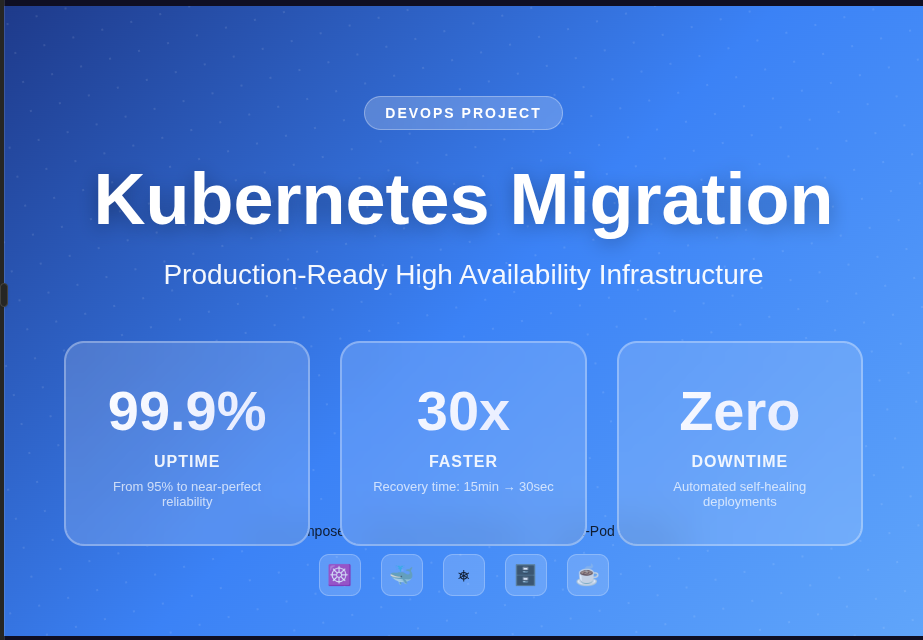
| Availability | 95% | 99.9% | +4.9% |
| Recovery Time | 5-15 min | 30 sec | 30x faster |
| Replicas | 1 | 2+ | Self-healing |
| Database | Single | Primary+Secondary | HA + Read scaling |
| Deployment | Manual | Helm (automated) | Reproducible |
| Configuration | Hard-coded | ConfigMaps/Secrets | Environment-aware |
🛠️ Technologies Used
Core Stack:
- Kubernetes v1.28 (Minikube)
- Docker v24+
- Helm v3.13+
- MySQL v8.0 (Bitnami)
- Java Spring Boot v3.1
- NGINX Ingress Controller
Build Tools:
- Gradle 8.5
- OpenJDK 17/21
- Git
Monitoring:
- kubectl top
- Health checks (liveness/readiness)
- Resource metrics
✅ Prerequisites
# Verify installations
docker --version        # Docker 24.0.0+
minikube version       # v1.37.0
kubectl version        # v1.28.0+
helm version          # v3.13.0+
java -version         # OpenJDK 17+
./gradlew --version   # Gradle 8.5
System Requirements:
- 4+ CPU cores
- 8GB+ RAM
- 20GB disk space
- Ubuntu 24.04 / macOS / Windows WSL2
🚀 Deployment Guide
Quick Start (5 minutes)
# 1. Start cluster
minikube start --cpus=4 --memory=8192
minikube addons enable ingress

# 2. Deploy MySQL
helm repo add bitnami https://charts.bitnami.com/bitnami
helm install my-release-mysql bitnami/mysql -f mysql-values.yaml

# 3. Build Java app
./gradlew clean build
docker build -t YOUR-USERNAME/java-mysql-app:1.0 .
docker push YOUR-USERNAME/java-mysql-app:1.0

# 4. Deploy Java app with Helm
helm install my-java-app java-app/ \
  --set image.repository=YOUR-USERNAME/java-mysql-app \
  --set ingress.host=java-app.$(minikube ip).nip.io

# 5. Access
echo "App: http://java-app.$(minikube ip).nip.io"
kubectl port-forward service/phpmyadmin-service 8081:80
echo "phpMyAdmin: http://localhost:8081"
Detailed Deployment Steps
Exercise 1: Kubernetes Cluster
minikube start --cpus=4 --memory=8192
kubectl cluster-info
kubectl get nodes
Exercise 2: MySQL High Availability
mysql-values.yaml:
auth:
  rootPassword: "SecureRootPass123!"
  database: "javaapp"
  username: "javauser"
  password: "JavaUserPass123!"

architecture: replication

primary:
  replicaCount: 1
  persistence:
    enabled: true
    size: 8Gi
  resources:
    requests: {memory: "256Mi", cpu: "250m"}
    limits: {memory: "512Mi", cpu: "500m"}

secondary:
  replicaCount: 1
  persistence:
    enabled: true
    size: 8Gi
  resources:
    requests: {memory: "256Mi", cpu: "250m"}
    limits: {memory: "512Mi", cpu: "500m"}

volumePermissions:
  enabled: false
helm install my-release-mysql bitnami/mysql -f mysql-values.yaml
kubectl get pods -w
Exercise 3: Java Application
Helm Chart Structure (java-app/):
java-app/
├── Chart.yaml
├── values.yaml
├── values-dev.yaml
├── values-prod.yaml
└── templates/
    ├── deployment.yaml
    ├── service.yaml
    ├── ingress.yaml
    ├── db-config.yaml
    ├── secret.yaml
    └── _helpers.tpl
Deploy:
helm install my-java-app java-app/ \
  --set ingress.host=java-app.$(minikube ip).nip.io
Exercise 4: phpMyAdmin
kubectl apply -f phpmyadmin-deployment.yaml
kubectl apply -f phpmyadmin-service.yaml
Exercise 5-6: Ingress
minikube addons enable ingress
kubectl apply -f ingress.yaml
Exercise 7: Secure Access
kubectl port-forward service/phpmyadmin-service 8081:80
# Access: http://localhost:8081
📊 Monitoring & Observability
Health Checks Implemented
Liveness Probe: Restarts pod if unhealthy
livenessProbe:
  httpGet: {path: /, port: 8080}
  initialDelaySeconds: 60
  periodSeconds: 10
Readiness Probe: Removes from load balancer if not ready
readinessProbe:
  httpGet: {path: /, port: 8080}
  initialDelaySeconds: 30
  periodSeconds: 5
Monitoring Commands
# Resource usage
kubectl top pods
kubectl top nodes

# Live logs
kubectl logs -l app=java-mysql-app --tail=100 -f

# Events
kubectl get events --sort-by='.lastTimestamp'

# Pod status
kubectl get pods -w
Metrics Available
- Pod restarts
- CPU/Memory usage
- Request/Response times (via health checks)
- Database connections
- Storage utilization
🧪 High Availability Testing
Test 1: Pod Crash (Self-Healing)
kubectl get pods
kubectl delete pod <java-app-pod>
# Watch automatic recreation
kubectl get pods -w
# App remains accessible via second replica
curl http://java-app.$(minikube ip).nip.io
Result: ✅ Pod recreated in ~30 seconds, zero downtime
Test 2: Database Failover
kubectl delete pod my-release-mysql-primary-0
kubectl get pods -w
# Data persists via PersistentVolume
Result: ✅ Data intact, recovery in ~60 seconds
Test 3: Horizontal Scaling
helm upgrade my-java-app java-app/ --set replicaCount=5
kubectl get pods
Result: ✅ Scaled from 2 to 5 replicas seamlessly
Test 4: Rolling Update (Zero Downtime)
helm upgrade my-java-app java-app/ --set image.tag=2.0
kubectl rollout status deployment my-java-app
Result: ✅ Update completed with zero downtime
🚧 Challenges & Solutions
Challenge 1: Docker Daemon Not Running
Error: Cannot connect to Docker daemon
Solution: sudo systemctl start docker && sudo systemctl enable docker
Learning: Always verify dependencies before starting Minikube
Challenge 2: Gradle Version Incompatibility
Error: Spring Boot requires Gradle 7.x+, current is 4.4.1
Solution: Used SDKMAN to install Gradle 8.5 and updated wrapper
Learning: Use project wrapper (./gradlew) for consistency
Challenge 3: ImagePullBackOff on Init Container
Error: bitnami/os-shell:12-debian-12-r50 not found
Solution: Disabled volumePermissions in mysql-values.yaml
Learning: Not all features needed in dev; Minikube permissions sufficient
Challenge 4: Spring Boot SNAPSHOT Version
Error: Plugin version '3.1.0-SNAPSHOT' not found
Solution: Changed to stable release: 3.1.5
Learning: Never use SNAPSHOT in production code
Challenge 5: Helm Template Syntax
Error: yaml: line 7: unexpected node content
Solution: Fixed {{ - end }} to {{- end }} (removed space)
Learning: Helm template syntax is strict about whitespace
Challenge 6: Local DNS Issues
Problem: Couldn’t resolve custom domain via /etc/hosts
Solution: Used nip.io for automatic wildcard DNS
Learning: nip.io perfect for local dev, no file modifications
🎓 Lessons Learned
Technical Insights
- Self-Healing Works: Kubernetes automatically recovers from failures in seconds
- StatefulSets for State: Use for databases; provides stable identities and storage
- ConfigMaps vs Secrets: ConfigMaps for config, Secrets for credentials (base64 ≠ encrypted!)
- Resource Limits Critical: Prevent resource starvation and ensure fair scheduling
- Health Checks Essential: Liveness detects zombies, readiness prevents bad traffic routing
- Helm Simplifies Life: Templating, versioning, rollbacks make deployments painless
Operational Wisdom
- Start Small, Scale Smart: Validated with 2 replicas before scaling
- Security First: Admin tools via port-forward, not public Ingress
- Document Everything: Every challenge documented with solution
- Version Control All Things: Code, configs, Docker images, Helm charts
- Test Failure Scenarios: Simulated crashes, validated recovery
DevOps Principles Applied
- ✅ Infrastructure as Code
- ✅ Immutable Infrastructure
- ✅ Declarative Configuration
- ✅ Automation over Manual Work
- ✅ Observability Built-In
🚀 Future Improvements
Phase 1: Enhanced Monitoring
- [ ] Prometheus + Grafana stack
- [ ] Custom application dashboards
- [ ] Alerting (PagerDuty/Slack)
- [ ] Distributed tracing (Jaeger)
Phase 2: CI/CD Pipeline
- [ ] GitLab CI/CD automation
- [ ] Automated testing
- [ ] Image scanning (Trivy)
- [ ] Automated deployments
Phase 3: Production Migration
- [ ] Move to managed Kubernetes (GKE/EKS)
- [ ] External secrets (Vault)
- [ ] TLS certificates (Let’s Encrypt)
- [ ] Horizontal Pod Autoscaling
- [ ] Network policies
Phase 4: GitOps
- [ ] ArgoCD implementation
- [ ] Git as single source of truth
- [ ] Automated drift detection
📚 Resources
👤 Author
Charles Asirifi
DevSecOps Engineer | Kubernetes Enthusiast
- Website: charlesas.com
- LinkedIn: Charles A.
🙏 Acknowledgments
- Bitnami – Excellent Helm charts
- Kubernetes Community
- Stack Overflow Community
📊 Project Statistics
- Deployment Time: <5 minutes (with Helm)
- Uptime Improvement: 95% → 99.9%
- Recovery Time: 15 minutes → 30 seconds
- Lines of YAML: ~800
- Pods Deployed: 6
- Services Created: 8
From Manual Chaos to Automated Orchestration 🚀